GitHub help desk integration
File a GitHub issue from the conversation, attach one that already exists, and let Fernand bring the thread back when the issue changes. Same idea as Linear, for teams who ship from GitHub.
Included on the free plan. No per-connector fee.
What this connects
The GitHub help desk integration is for product and engineering teams who already live in GitHub Issues. Support should not be a second, disconnected queue. The report, the issue, and the follow-up with the customer belong together.
From any Fernand conversation you can create a GitHub issue or link an existing one. Fernand mirrors most GitHub issue fields so you keep the same control you have in GitHub, without leaving the inbox. It is keyboard-first, like the rest of the product.
When the issue’s status changes on GitHub, Fernand updates the linked conversation. Re-open an issue and the conversation can re-open with it. Close the issue and support sees it, which is how you remember to tell the customer.
What you can do in Fernand
Create a GitHub issue from a conversation
Open GitHub in the sidebar or hit ⌘K. Fill in title, description, labels, assignees, and the other fields Fernand mirrors from GitHub. The issue is linked back to the thread automatically.
Link an existing issue
Search by title or number and attach it. The conversation stays synced with the issue’s status instead of becoming a screenshot in a GitHub comment.
Status sync both ways
When an issue changes on GitHub, Fernand updates the linked conversation. Re-opening an issue can re-open the conversation so you can follow up.
Fields that feel like GitHub
The create flow is not a lowest-common-denominator form. Most GitHub issue fields are mirrored so you are not bouncing back to GitHub to set labels and assignees.
Keyboard-first
Command palette, sidebar, no extra chrome. The GitHub panel is meant to be as fast as filing an issue in GitHub itself.
API for the same workflow
The Fernand API can search issues across connected repositories, create and attach them, detach them, and read what is already linked. Coding agents can use that without a full-access key.
How it looks in the inbox
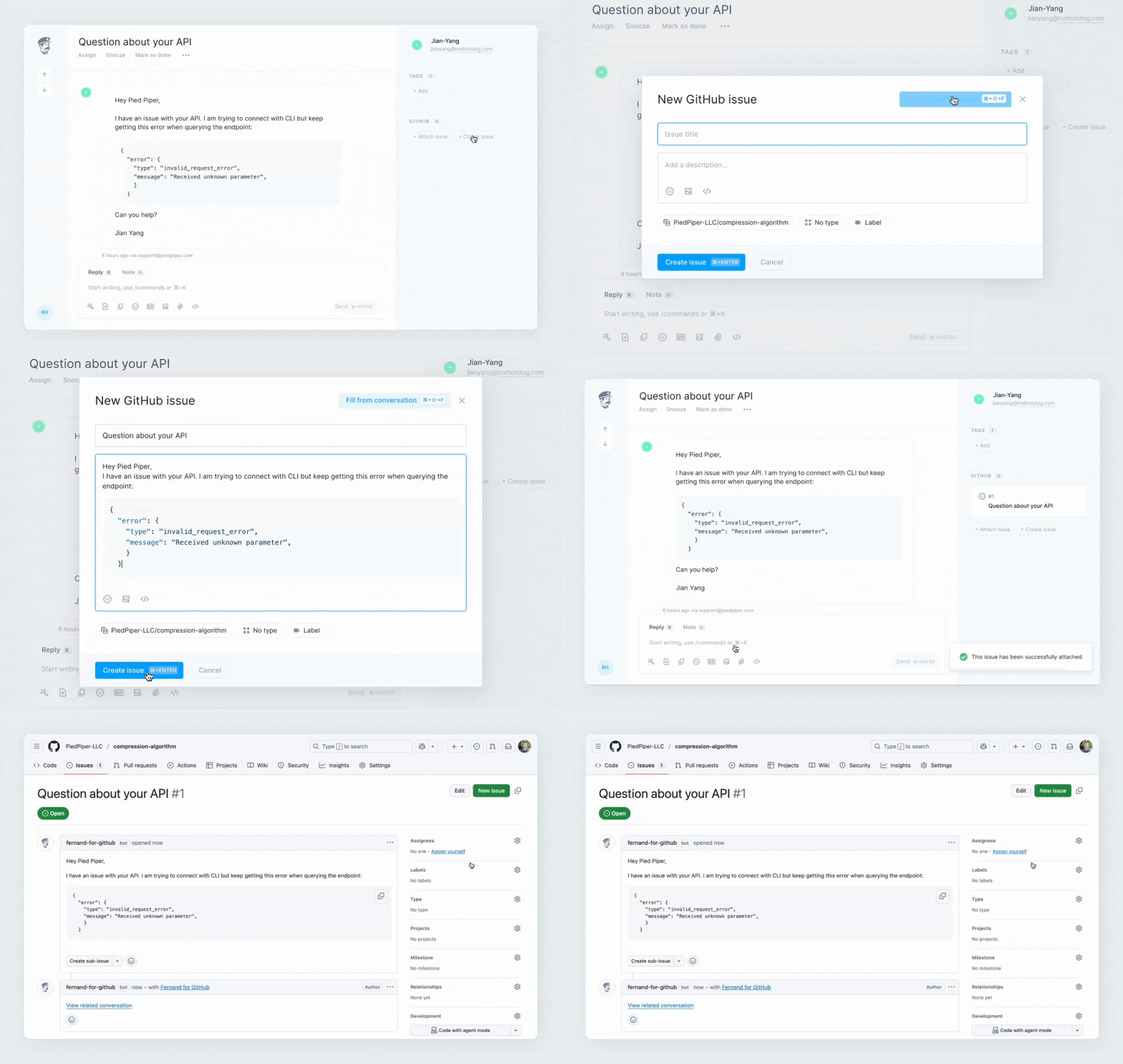
Concrete use cases
A production bug arrived as an email
Create the GitHub issue from Fernand with the customer’s description still attached. Engineering opens GitHub. You keep clearing the rest of the inbox.
The issue already exists
Search GitHub from the conversation, attach the existing issue, and tell the customer you are on the same report instead of opening a duplicate.
The fix shipped and nobody told support
Status sync puts the closed issue back in view. You write the customer once, with the outcome, instead of discovering it in the changelog.
You use GitHub, a teammate uses Linear
Fernand supports both. Use GitHub where the repo lives, Linear where the product team lives, from the same inbox.
How it fits your support workflow
Support stays in Fernand
The GitHub panel sits on the conversation. You never have to paste a customer email into a GitHub issue body unless you want to.
Engineering stays in GitHub
The issue is a real GitHub issue, with the fields your repo already uses. The Fernand conversation is the customer context sitting next to it.
The customer gets an ending
When issue status changes, the conversation can come back. That is the difference between a help desk that files tickets and one that closes loops.
Keyboard shortcuts
⌘K Open the command palette to create or attach a GitHub issue
How to get started
- Press G then S, open Integrations, and select GitHub.
- Connect your repository and confirm permissions.
- Open a conversation and use the GitHub panel, or ⌘ K, to create or attach an issue.
Once GitHub is connected, the panel is available on conversations for the workspace.
Questions about our GitHub integration
Straight answers, without the marketplace filler.
- Does Fernand integrate with GitHub Issues?
- Yes. Fernand has a native GitHub help desk integration. You can create GitHub issues from conversations, attach existing issues, and keep status in sync.
- How is this different from the Linear integration?
- The workflow is the same idea: create or attach an issue, keep customer context next to engineering work, and reopen the conversation when status changes. Use GitHub if that is where your issues live. Fernand also has a native Linear integration.
- What happens when a GitHub issue is closed or reopened?
- Fernand updates the linked conversation. Re-opening an issue can re-open the conversation so you can follow up with the customer. Closing it is visible to support immediately.
- Can I search existing GitHub issues from Fernand?
- Yes. You can search by title or number from the conversation or the command palette, then attach the issue. The API can search across connected repositories as well.
- Can a coding agent file GitHub issues through Fernand?
- Yes. The Fernand API can create, attach, detach, and list GitHub issues on a conversation. Use a scoped API key so the agent can only do that job.